-
Install MirrorQ
Install from GitHub with access to the private repository.
git clone https://github.com/QudeLeap/mirrorq-cli.git
cd mirrorq-cli
cargo install --path . --locked --force
mirrorq --version
This guide uses
mirrorq 0.1.4-rc.3. -
Sign in
Approve the sign-in request in your browser.
mirrorq login -
Choose a task
Use the full
VALIDATOR/TASK_IDfrom the list.mirrorq list -
Prepare your program
Follow the format guide in Tasks & Evaluation. Your program must read the dataset path and write its result to the output path.
your-program <dataset-directory> <output-file> -
Check with public sample data
Use the sample and checker for your input view in Tasks & Evaluation, under Task resources, when provided.
-
Submit privately
Set
VALIDATOR/TASK_IDandVIEWfrom step 03, and replacepython solver.pywith your program.Omit
--viewfor tasks with only one input view. -
Publish a completed result
In My Submissions, choose Publish on a completed run, or use its submission ID below. Results stay private until published.
mirrorq publish --submission-id SUBMISSION_ID -
Compare published results
Compare scores for the same task and review its ranking rules.
Troubleshooting
-
Not signed in
mirrorq login -
Output rejected
Check the error in My Submissions and correct your output using the task's format guide.
-
Check a run
Check its status using the submission ID from My Submissions.
mirrorq status --submission-id SUBMISSION_ID -
Stop an unfinished run
Use Cancel in My Submissions, or run:
mirrorq cancel --submission-id SUBMISSION_ID
How scoring works
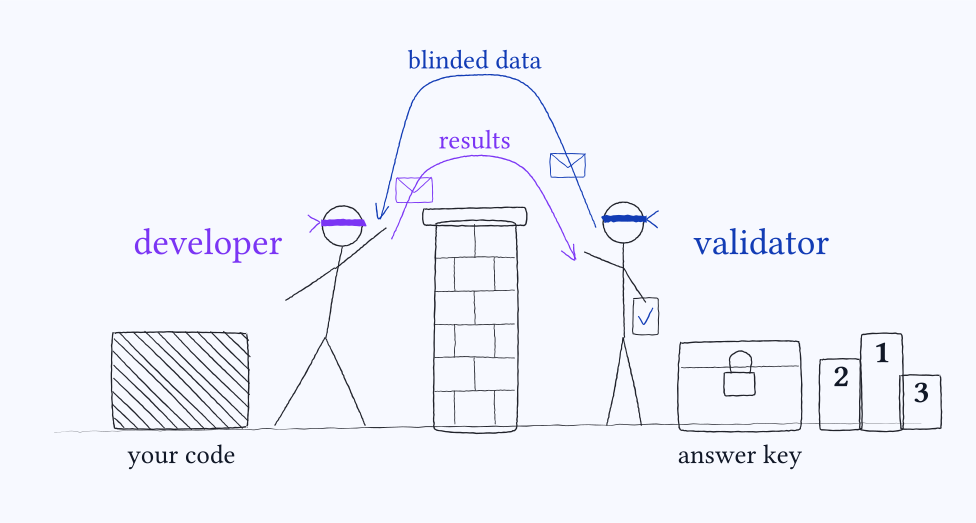
A score calculated on your computer from public sample data is a local score. It is not uploaded automatically and cannot be imported as a verified score.
mirrorq submitdownloads a freshly generated blinded dataset.- It runs your program on your machine and automatically uploads its output.
- The server scores that output. The answer key never leaves the server.
Citation
If MirrorQ results appear in your work, please cite:
@misc{mirrorq,
  title  = {MirrorQ},
  author = {{QudeLeap}},
  year   = {2026},
  url    = {https://bench.qudeleap.com}
}